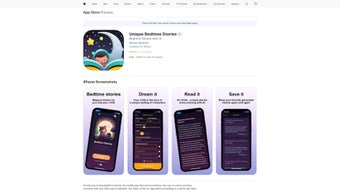

Download Unique Bedtime Stories – personalized bedtime story creator for families
Overview – A fresh take on bedtime rituals
Unique Bedtime Stories is an innovative web‑based application that reimagines the classic bedtime routine. Powered by artificial intelligence, the platform lets parents and children co‑create custom stories where the child becomes the hero of the narrative. Whether the little one loves dinosaurs, space adventures, or fairy‑tale kingdoms, the app dynamically weaves those interests into a seamless storyline, complete with familiar characters and settings that feel instantly recognizable.
The result is a nightly experience that feels less like a chore and more like a shared adventure, fostering creativity, language development, and emotional bonding. Because the service runs entirely in the browser, there’s no need for bulky installations, and the interface is intentionally simple: a few clicks, a few prompts, and a magical story appears. Importantly, Unique Bedtime Stories takes privacy seriously—no personal data is collected, stored, or shared, making it a safe environment for children of any age.
Families can also save each tale to a personal library, building a growing archive that mirrors a child’s evolving imagination over months and years. This combination of AI‑driven personalization, ease of use, and privacy‑first design positions the app as a must‑have tool for modern families looking to enrich their nighttime routine.
Key Features & Benefits – What sets this tool apart
- AI‑personalized narratives: The engine analyses entered interests and automatically crafts a story where the child is the main character.
- Familiar character integration: Users can add beloved cartoon or book characters, making each tale instantly engaging.
- Story library: Every generated story can be saved, edited, and revisited, creating a living collection that grows with the child.
- Multi‑language support: The app offers story generation in several languages, supporting bilingual households.
- Zero data collection: No personal identifiers are stored, ensuring a secure and private storytelling space.
- Cross‑platform accessibility: Works on any modern browser, whether on Windows, macOS, Android, or iOS devices.
- Simple export options: Stories can be downloaded as PDF or shared via email, perfect for bedtime reading on tablets or printed copies.
- Adaptive growth: As the child’s interests change, the AI learns and suggests fresh themes, keeping the experience fresh.
Beyond the raw functionality, Unique Bedtime Stories delivers tangible benefits for both parents and kids. Parents save time—no longer need to invent a new tale each night—while still providing a personalized experience that feels handcrafted. Children, on the other hand, see themselves as protagonists, which boosts confidence and encourages a love for reading.
The ability to revisit previous stories also aids memory retention and provides a comforting sense of continuity. For educators and child‑development specialists, the app offers a low‑cost way to integrate storytelling into curricula, reinforcing language skills and imagination without any subscription hurdles. Overall, the feature set balances creativity, convenience, and safety, making it an appealing addition to any family’s digital toolbox.
Installation, Compatibility & How to Use – Getting started in minutes
Unique Bedtime Stories runs entirely in a web browser, meaning it is compatible with Windows 10/11, macOS Monterey and later, Android 8.0+, and iOS 13+. As long as the device can run a modern browser (Chrome, Firefox, Safari, Edge), the app will function flawlessly.
Step‑by‑step installation
- Open your preferred browser and navigate to uniquebedtimestories.com.
- Click the bright “Start Creating” button on the homepage.
- No download is required—simply grant the site permission to store data locally for your story library.
- If you prefer offline access, click “Download PDF” after a story is generated; the file is saved directly to your device.
Creating your first story
Once the app loads, you’ll see a clean form with three key fields:
- Child’s name: Enter the name you want to appear as the hero.
- Interests: Type a few favorite topics (e.g., “space rockets,” “dinosaurs,” “fairy castles”).
- Optional characters: Choose from a dropdown of popular characters or upload a custom illustration.
After filling the form, hit “Generate Story.” Within seconds, the AI produces a 500‑word narrative that you can read aloud, edit, or save. The interface also offers a “Read Aloud” button that uses text‑to‑speech, perfect for younger children who are still learning to read.
Tips for optimal use
- Keep interest keywords specific; “space” yields more vivid details than a generic “fun.”
- Use the “Add a twist” toggle to introduce surprise elements, keeping stories fresh.
- Regularly export stories to PDF; this creates a physical bedtime book that can be placed on a nightstand.
- Invite a sibling or friend to co‑create a story for a collaborative experience.
Because the platform is cloud‑agnostic, updates are applied instantly—there’s no need to manually download patches or worry about version incompatibility. This ensures you always have the latest AI models and security fixes without lifting a finger.
Pros & Cons, FAQ, and Final Thoughts – What families really think
Pros
- Highly personalized stories that keep children engaged.
- No personal data collection—privacy‑first approach.
- Works on any device with a modern browser.
- Free to use with optional premium features (e.g., custom illustrations).
- Instant story generation saves parents time.
Cons
- Requires an internet connection for AI processing.
- Limited to the themes the AI has been trained on; extremely niche interests may need manual tweaking.
- Advanced editing tools (e.g., font styling) are only available in the premium tier.
Frequently Asked Questions
Is Unique Bedtime Stories really free?
The core story‑generation feature is completely free. A premium subscription unlocks extra options such as custom artwork, offline mode, and advanced story editing.
Do I need to create an account?
No account is required. Stories are stored locally in your browser and can be exported at any time. If you opt for the premium plan, an account is created solely for subscription management.
Can I use the app on a tablet or phone?
Absolutely. The responsive design works on Android and iOS tablets and smartphones, allowing bedtime storytelling on the go.
How does the AI protect my child’s privacy?
The service does not store names, interests, or any personally identifiable information on its servers. All data processing happens in memory and is discarded after the story is generated.
What if I want to edit a story after it’s generated?
Each story opens in an inline editor where you can tweak sentences, add new paragraphs, or replace character names. Premium users gain access to richer formatting tools.
Conclusion – Should you download Unique Bedtime Stories?
For families seeking a fresh, interactive way to make bedtime special, Unique Bedtime Stories offers a compelling blend of AI‑driven personalization, privacy protection, and cross‑platform convenience. The free tier already delivers high‑quality, custom narratives that can transform the nightly routine from a repetitive chore into an imaginative adventure. While an internet connection is required and some niche interests may need manual adjustments, the overall experience is smooth, secure, and genuinely fun.
Parents who value their child’s creativity and want a hassle‑free tool will find this web app an excellent addition to their digital toolkit. Ready to give your child the starring role they deserve? Download Unique Bedtime Stories now and start crafting magical nights today.



.png)



